# Tools to extract live data

* The grabber is an HTML file and runs in a browser tab.&#x20;
* Adjust the grabber in an editor with the settings in the tables.&#x20;
* The grabber pulls one specific parameter from the \*/current API.&#x20;
* The \*/current API must be activated and switched on.
* Monochrome background.

{% content-ref url="current" %}
[current](https://docs.racemap.com/api/current)
{% endcontent-ref %}

### Basic grabber

{% hint style="info" %}
[<mark style="color:blue;">**Download the basic grabber for your usage.**</mark>](https://drive.google.com/uc?id=14sVBD9RNkzpkP5FxbxPK01ZrGZzijrFD\&export=download)\
The file (grabCurrentAPI.html) is set to call a sample event with infinite real-time data.
{% endhint %}

{% tabs %}
{% tab title="deviceIds" %}
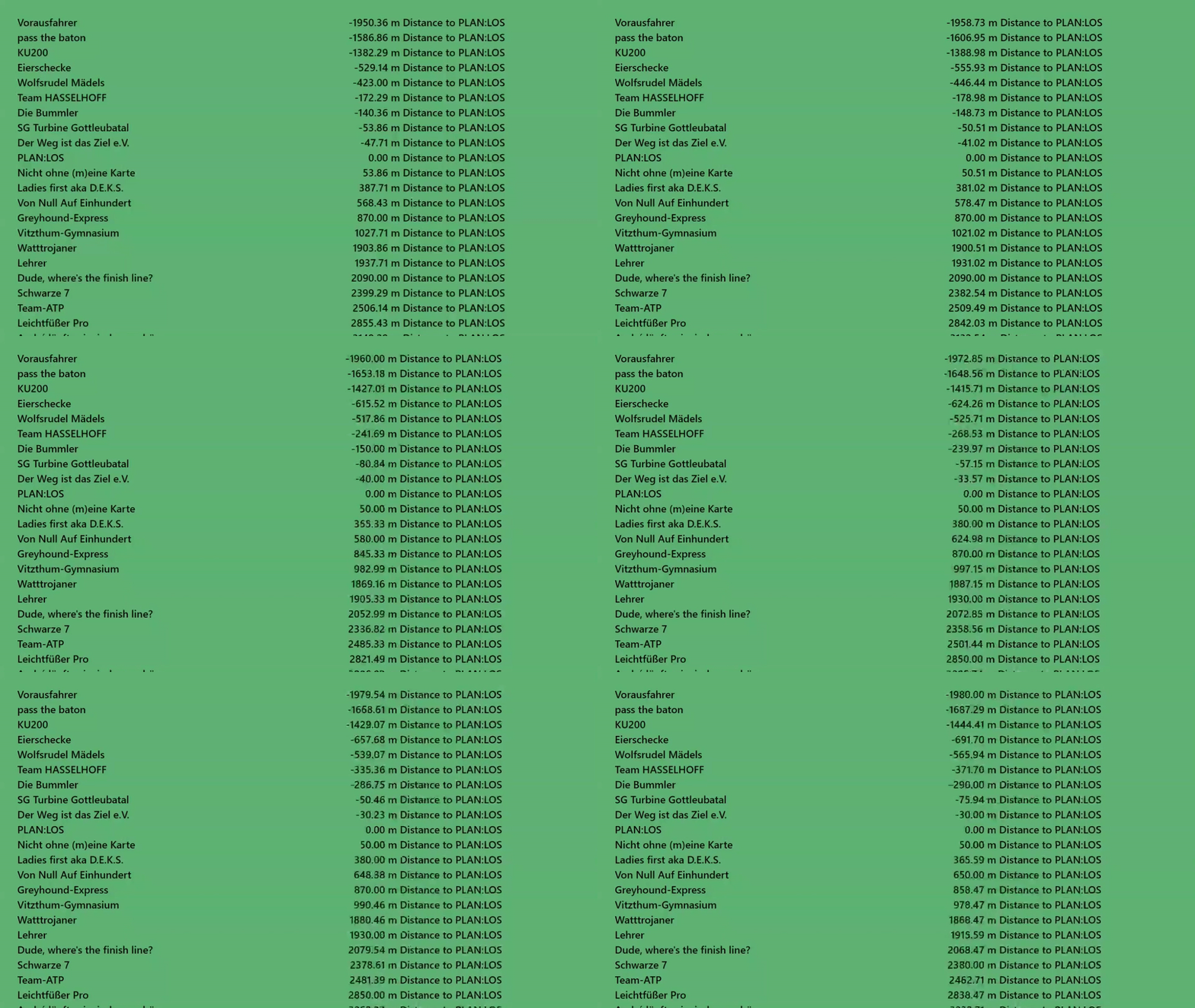
**Options 1 to 3:** With set `deviceIds` or with set `startNumbers` or with set `showLeaders` the grabber shows the parameter for one or for more specific devices instead of the list with all devices.&#x20;
{% endtab %}

{% tab title="refDeviceId" %}
**Options 4 and 5:** Set `refDeviceId` or `refStartNumber` for calculation with reference device instead of the leader device.\
`gapAverage`, `gap`, `gapChase` and `gapDistance` are calculated for the leader (device with smallest `toFinish`) by default.&#x20;
{% endtab %}
{% endtabs %}

<figure><img src="https://1672210197-files.gitbook.io/~/files/v0/b/gitbook-x-prod.appspot.com/o/spaces%2F-LSRNxaH2Ju9Flr7JhJD%2Fuploads%2F8gQzwEwFAJgEAb3qqsBY%2Fgrab-Value.gif?alt=media&#x26;token=43d468c1-2c0e-49f2-8e74-caddf54826ed" alt=""><figcaption><p><code>deviceIds = "6336f41309be310001a58976"</code> to show one participant only</p></figcaption></figure>

<figure><img src="https://1672210197-files.gitbook.io/~/files/v0/b/gitbook-x-prod.appspot.com/o/spaces%2F-LSRNxaH2Ju9Flr7JhJD%2Fuploads%2FvU78RjkA6Hu4IzPGU9kX%2FGrabberRefDevice.gif?alt=media&#x26;token=62f3158b-6966-4709-b0b7-27fb7bfb3626" alt=""><figcaption><p><code>refDeviceId = "6336f41309be310001a58971"</code> to show <code>gapDistance</code> to team PLAN:LOS</p></figcaption></figure>

<figure><img src="https://1672210197-files.gitbook.io/~/files/v0/b/gitbook-x-prod.appspot.com/o/spaces%2F-LSRNxaH2Ju9Flr7JhJD%2Fuploads%2Ft8USk4bUk0e3SgkbWd2k%2Fgrab-Table.gif?alt=media&#x26;token=66e739a8-be85-4073-b0cf-167366af910f" alt=""><figcaption><p>Without <code>deviceIds</code>: list of all participants </p></figcaption></figure>

<table><thead><tr><th width="191">Field</th><th>Description [unit]</th><th>Sample</th></tr></thead><tbody><tr><td><code>eventId</code></td><td>Id of the tracking map <br>Add optional query parameters, also</td><td><code>"6336f41309be310001a5894b"</code> or<br><code>"6336f41309be310001a5894b?interpolation=false&#x26;currentSpeedDuration=60"</code></td></tr><tr><td><code>outputData</code></td><td>Parameter to be shown in browser tab</td><td><code>"gapAverage"</code> or <code>"speed"</code></td></tr><tr><td><code>textBehind</code></td><td>Add text behind the unit</td><td><code>"Distance to go"</code> or <code>"🏁"</code></td></tr><tr><td><code>withStarterName</code></td><td>Show or hide the name of the participant</td><td><code>true</code> or <code>false</code></td></tr><tr><td><code>withStartNumber</code></td><td>Show or hide the race number of the participant</td><td><code>true</code> or <code>false</code></td></tr><tr><td><code>pollingRate</code></td><td>Time beween polling in [s]</td><td><code>2</code> or <code>15</code></td></tr><tr><td><code>deviceIds</code></td><td><strong>Option 1</strong>: ids of one or more devices, values of these devices only are pulled, <code>[]</code> shows all devices</td><td><code>[]</code> or <code>["6336f41309be310001a58976"]</code> or <code>["6336f41309be310001a58975", "6336f41309be310001a58973"]</code></td></tr><tr><td><code>startNumbers</code></td><td><strong>Option 2</strong>: Race numbers of one or more devices, values of these devices only are pulled, <code>[]</code> shows all devices</td><td><code>[]</code> or <code>["051"]</code> or <code>["051", "050"]</code></td></tr><tr><td><code>showLeaders</code></td><td><strong>Option 3</strong>: Number of shown leading devices determined of <code>fromStart</code>; <code>0</code> shows all devices</td><td><code>0</code> or <code>1</code> or <code>5</code> or <code>10</code></td></tr><tr><td><code>refDeviceId</code></td><td><strong>Option 4</strong>: id of a reference for calculation of <code>gapAverage</code>, <code>gap</code>, <code>gapChase</code> and <code>gapDistance</code></td><td><code>"6336f41309be310001a58977"</code></td></tr><tr><td><code>refStartNumber</code></td><td><strong>Option 5</strong>: Bib of a reference for calculation of <code>gapAverage</code>, <code>gap</code>, <code>gapChase</code> and <code>gapDistance</code></td><td><code>"053"</code></td></tr></tbody></table>

#### Set imperial units

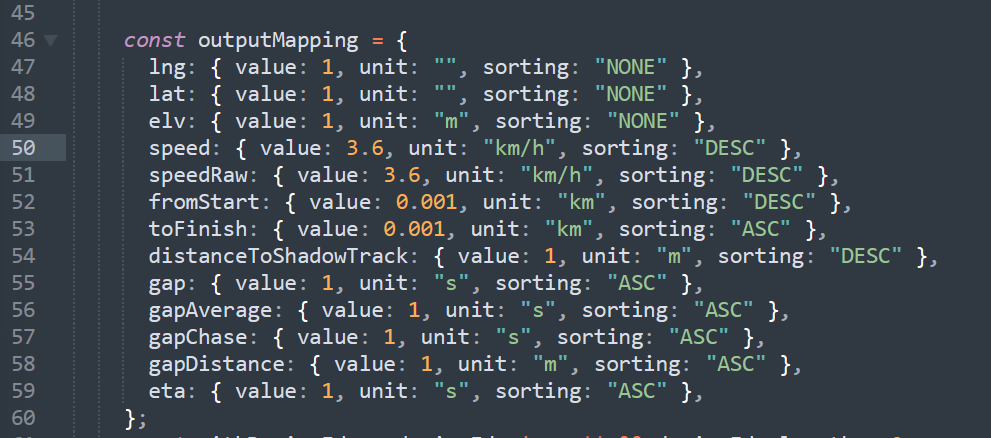
<figure><img src="https://1672210197-files.gitbook.io/~/files/v0/b/gitbook-x-prod.appspot.com/o/spaces%2F-LSRNxaH2Ju9Flr7JhJD%2Fuploads%2F98UNpTseojyH43O0MBQB%2FScreenshot%202023-09-29%20110114.png?alt=media&#x26;token=dffe55fd-d8de-425d-9ac1-def22081f3ad" alt=""><figcaption><p>Open grabber tool in an editor</p></figcaption></figure>

In order to show `speed` values as miles per hour replace line 50 with:

```html
speed: { value: 2.2369356, unit: "mph", sorting: "DESC" },
```

&#x20;In order to show `speedRaw` values as miles per hour replace line 51 with:

```html
speedRaw: { value: 2.2369356, unit: "mph", sorting: "DESC" },
```

In order to show `fromStart` values as miles replace line 52 with:

```
fromStart: { value: 0.000621371, unit: "mile", sorting: "DESC" }
```

In order to show `toFinish` values as miles replace line 53 with:

```
toFinish: { value: 0.000621371, unit: "mile", sorting: "DESC" }
```

### Drafting tool

{% hint style="info" %}
[<mark style="color:blue;">**Download the drafting tool for your usage.**</mark>](https://drive.google.com/uc?id=1HHA8DAGreR5sLF4W3P9DXcnitFt5_LQV\&export=download)\
The file (grabCurrentAPIDrafting.html) is set to call a sample event with infinite real-time data.
{% endhint %}

* The table sorts all devices in ascending order according to the `toFinish` parameter.&#x20;
* "To previous"-column shows the distance to the device that moves ahead.&#x20;
* "Draft time"-column starts counting the time when the device is moving within the draft zone (`alertValue` in \[m] set distance to the device ahead).&#x20;
* "Drafts"-column detects a draft when drafting takes longer than the set `alertTime` in \[s]. &#x20;
* Hover over the number of drafts for additional information.

<figure><img src="https://1672210197-files.gitbook.io/~/files/v0/b/gitbook-x-prod.appspot.com/o/spaces%2F-LSRNxaH2Ju9Flr7JhJD%2Fuploads%2Fb583giOnrI1VpHCFNGu7%2FDrafting.gif?alt=media&#x26;token=c7d66237-4464-482b-9bbc-62a5cab7b120" alt=""><figcaption><p>Christoph overtakes Konrad monitored by the drafting tool. At 14:27:31 Christoph was moving for 44s in the draft zone behind Konrad.</p></figcaption></figure>

### Spotter tool

{% hint style="info" %}
[<mark style="color:blue;">**Download the spotter tool for your usage.**</mark>](https://drive.google.com/uc?id=1gKwfzmfXn-VVGpws1mDMW5wPjTuUinHL\&export=download)\
The file (spotter.html) is set to call a sample event with infinite real-time data.
{% endhint %}

* Define up to three different spots (distance from start in m).&#x20;
* The table sorts participants in the sensitive range (`rangeBeforeSpot` and `rangeAfterSpot`) coming closer to the spot.&#x20;

<figure><img src="https://1672210197-files.gitbook.io/~/files/v0/b/gitbook-x-prod.appspot.com/o/spaces%2F-LSRNxaH2Ju9Flr7JhJD%2Fuploads%2FJdN4ZzisXB8tl8Y4qRjx%2FSPOTTER-large.gif?alt=media&#x26;token=6ce34e66-9b55-4d80-809f-d0f9f0c82a92" alt=""><figcaption><p>Real-time information from anywhere on the race-course e.g. for the speaker.</p></figcaption></figure>