> For the complete documentation index, see [llms.txt](https://docs.racemap.com/llms.txt). Markdown versions of documentation pages are available by appending `.md` to page URLs; this page is available as [Markdown](https://docs.racemap.com/apps/tracking/white-label.md).

# Custom app version

<figure><img src="/files/9AQQ52xtdzjtZmnjlAQg" alt="" width="375"><figcaption></figcaption></figure>

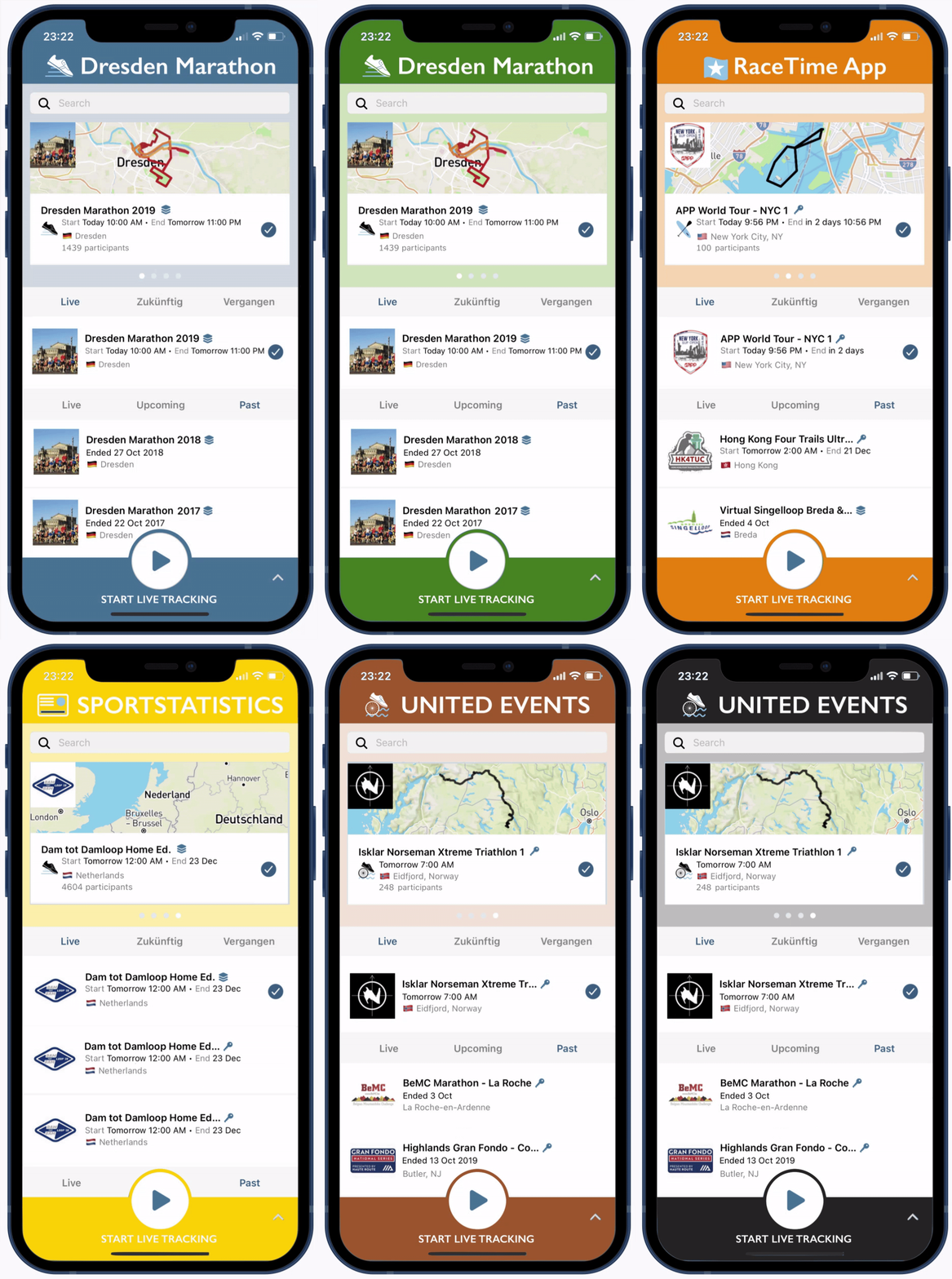
RACEMAP offers a branded version of our GPS tracking app. You can adapt this custom app solution for one specific event, for an event series, and as a timer to show all your events. The custom app includes the following benefits:

* Your branding is featured in the app for participants, spectators, and organizers.
* Separate listings in both Google Play (Android) and the App Store (iOS).
* Select specific events from your RACEMAP account to be exclusively published in your custom app(s).

We can deliver your app within **two weeks** after receiving the following content:

### Meta information

1. What languages should be supported (English, German, French, Spanish, Polish, Turkish)
2. List of existing events in RACEMAP to build screenshots for the app stores. Finished events can be used as well.
3. A contact mail address on your side for receiving updates about the app.
4. The preferred release date, keep two-weeks buffer in mind.
5. Three colors as html hex code in the flavors normal, light, and dark. You can use tools like [color pickers ](https://htmlcolorcodes.com/color-picker/)to get them.

<figure><img src="/files/6HWzUMhDTxuVZ8uLivoE" alt=""><figcaption><p>Three color codes and it's usage in the custom app. Set normal (<kbd>007f0e</kbd>), light (<kbd>d0e7d2</kbd>), and dark (<kbd>009b08</kbd>) color hex code.</p></figcaption></figure>

### Images

<table><thead><tr><th width="176">Name</th><th width="119">Format</th><th width="179.66668701171875">Resolution</th><th>Transparency</th></tr></thead><tbody><tr><td>In app logo</td><td><a href="https://en.wikipedia.org/wiki/SVG">SVG</a></td><td><a href="https://en.wikipedia.org/wiki/Image_resolution">300x80</a> px</td><td>transparent background</td></tr><tr><td>Launch logo</td><td>SVG</td><td>1024x1024 px</td><td>no</td></tr><tr><td>Feature graphic</td><td><a href="https://en.wikipedia.org/wiki/PNG">PNG</a></td><td>1024x500 px</td><td>no</td></tr><tr><td>Icon</td><td>SVG</td><td>1024x1024 px</td><td>no</td></tr></tbody></table>

<figure><img src="/files/lCH3ZIpCzU1bbT0W7YB2" alt=""><figcaption><p>Required four images for custom app: In app logo, launch logo, feature graphic, and icon</p></figcaption></figure>

### Texts

Provide all texts in the languages supported by your custom app.

**App store descriptions**

* Short Descriptio&#x6E;**\*** max. 80 characters
* Long Descriptio&#x6E;**\*** max. 400 characters

**Name of the custom app**

* Short nam&#x65;**\*** for app menu max. 12 characters
* Long nam&#x65;**\*** for stores max. 30 characters

### URLs

* Suppor&#x74;**\***
* Marketing
* Terms of Use

### Contact information

* Support Emai&#x6C;**\***
* Phone Numbe&#x72;**\***
* WhatsApp etc.
* List of email addresses for iOS testflight

**(\*) Mandatory information**

Send information to: **<apps@racemap.com>**


---

# Agent Instructions
This documentation is published with GitBook. GitBook is the documentation platform designed so that both humans and AI agents can read, navigate, and reason over technical content effectively. Learn more at gitbook.com.

## Querying This Documentation
If you need additional information that is not directly available in this page, you can query the documentation dynamically by asking a question.

Perform an HTTP GET request on the current page URL with the `ask` query parameter, and the optional `goal` query parameter:

```
GET https://docs.racemap.com/apps/tracking/white-label.md?ask=<question>&goal=<endgoal>
```

`ask` is the immediate question: it should be specific, self-contained, and written in natural language.
`goal` is optional and describes the broader end goal you are ultimately trying to accomplish on behalf of the user. GitBook uses it to tailor the answer towards what is most useful for that goal.

The response will contain a direct answer to the question and relevant excerpts and sources from the documentation.

Use this mechanism when the answer is not explicitly present in the current page, you need clarification or additional context, or you want to retrieve related documentation sections.
