> For the complete documentation index, see [llms.txt](https://docs.racemap.com/llms.txt). Markdown versions of documentation pages are available by appending `.md` to page URLs; this page is available as [Markdown](https://docs.racemap.com/billing.md).
# Billing cycles
How RACEMAP billing cycles work: a cycle is 7 whole days counted in UTC — not your local time. Understand why an event can occasionally cross into a second cycle, and how to avoid it.
Live tracking is billed per **event cycle**. This page explains exactly how a cycle is measured so you can predict your costs — and understand why, occasionally, one event is billed as two cycles.
For current prices and plans, see the [RACEMAP pricing page](https://go.racemap.com/pricing). This page explains the *timing* behind those prices.
### How a billing cycle works
A billing cycle is **7 days**, and it starts when your event first goes live. Once started, a cycle is billed **once** — no matter how many of those 7 days the event is actually active.
Two details decide how many cycles an event costs:
* **Days are counted in whole UTC calendar days.** Every day your event is active is recorded against a UTC calendar date (`YYYY-MM-DD` in UTC).
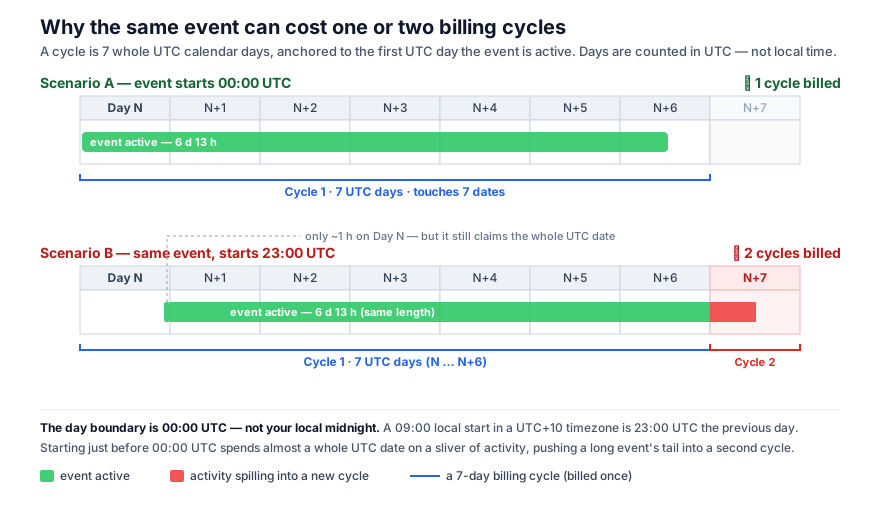
* **The cycle is anchored to the first UTC day your event is active.** It then covers that day plus the following 6 UTC days (7 dates in total). Any activity on an **8th** UTC date starts a **new** cycle.
### Why UTC — and not your local time
This is the part that surprises people. The day boundary that matters for billing is **00:00 UTC**, not midnight in your local timezone.
Because of the timezone offset, your local clock and the UTC date can disagree. For an organizer in a UTC+10 timezone, a race that starts at **09:00 local time** starts at **23:00 UTC the previous day**. So the very first UTC date of the event gets only \~1 hour of activity — but it still counts as a full UTC date of the cycle.
For short, single-day events this is invisible: the event simply spans one or two UTC dates, comfortably inside one 7-day cycle, and is billed once.
It only matters for **long events** that run close to the full 7 days.
The same event duration can cost one or two cycles, depending on its start time relative to 00:00 UTC.
### Worked example: the same event, two outcomes
Consider a single event that is active for **6 days and 13 hours** — comfortably less than 7 days.
* **Starts at 00:00 UTC** → it ends midday on day N+6, touching **7 UTC dates** (day N through N+6). That fits in one cycle → **1 cycle billed.**
* **Starts at 23:00 UTC** → the first UTC date gets only \~1 hour of activity, and the event ends midday on day N+7, touching **8 UTC dates** (day N through N+7). The 8th date falls outside the first cycle → **2 cycles billed.**
The event is exactly the same length in both cases. The only difference is the start time relative to 00:00 UTC.
{% hint style="info" %}
**It is not about your local time, and not about the number of hours.** Cycles are counted in whole UTC calendar dates. A long event that begins shortly before 00:00 UTC "spends" a whole UTC date on a sliver of activity, which can push its tail into a second cycle.
{% endhint %}
### How to avoid an unexpected second cycle
* For multi-day events approaching 7 days, check the start time in **UTC**, not local time.
* Avoid starting an activation shortly **before 00:00 UTC** — that wastes almost a whole UTC date and brings the end of your 7-day window forward by a day.
* Remember the cycle is anchored to the **first** activation. A test or preview activation days before the event can start the clock early; keep it in mind for long events.
* To avoid accidental usage (and cost) after your event finishes, see [Auto-pausation](/api/auto-pausation.md).
### See also
* [RACEMAP pricing page](https://go.racemap.com/pricing) — current prices, plans and add-ons (the source of truth for amounts).
* [Auto-pausation](/api/auto-pausation.md) — how RACEMAP pauses the Data API after an event to prevent unexpected costs.
---
# Agent Instructions
This documentation is published with GitBook. GitBook is the documentation platform designed so that both humans and AI agents can read, navigate, and reason over technical content effectively. Learn more at gitbook.com.
## Querying This Documentation
If you need additional information that is not directly available in this page, you can query the documentation by asking a question.
Perform an HTTP GET request on the following URL with the `ask` and `goal` query parameters:
```
GET https://docs.racemap.com/billing.md?ask=&goal=
```
`ask` is the immediate question: it should be specific, self-contained, and written in natural language.
`goal` is what the user is ultimately trying to achieve, the reason they need the answer. Sharing it helps GitBook give you a better, more relevant answer. A goal is most helpful when it describes the outcome the user wants rather than restating the question. For example, with `ask=how do I create an API token`, a goal like `automate deployments from our CI pipeline` lets GitBook tailor the answer to that use case.
The response will contain a direct answer to the question and relevant excerpts and sources from the documentation.
Use this mechanism when the answer is not explicitly present in the current page, you need clarification or additional context, or you want to retrieve related documentation sections.